
Download SideBooks – PDF reader, comic viewer, Android app, free PDF tool, reading app, document viewer
Overview
SideBooks is a lightweight, free desktop application designed for Android devices, developed by Tokyo Interplay Co., Ltd. The software functions as a versatile document and media viewer, primarily tailored for reading PDF files and comic books. It supports multiple formats, including PDF, ZIP, CBZ, RAR, and CBR, making it a convenient tool for users who manage digital reading materials across different file types. The app aims to simplify the process of accessing and navigating through digital content, especially for users who frequently read comics or technical documents on mobile platforms.
Targeted at both casual readers and professionals who rely on digital documents, SideBooks offers essential reading features such as page navigation, text search, and automatic bookmarking of the last read page. These capabilities help maintain continuity during reading sessions, reducing the need for manual tracking. The app is particularly useful for users who prefer a streamlined experience without the complexity of full-featured office suites.
Real-world usage scenarios include reading digital comics during commutes, reviewing PDF manuals on the go, or organizing archived documents. The developer did not provide additional system requirements, and performance details were not specified. However, the app’s minimal size of 10.5 MB suggests a focus on efficiency and low resource consumption.
Key Features & Capabilities
- Multi-format Support: SideBooks enables users to open and view a wide range of file types, including PDF, ZIP, CBZ, RAR, and CBR. This allows seamless access to both standard documents and compressed comic archives without requiring external decompression tools.
- Page Navigation & Auto-Bookmarking: The app includes in-page navigation via links or manual scrolling, with the ability to save the last viewed page number. This ensures users can resume reading from where they left off, improving workflow continuity.
- Text Search Functionality: Users can search for specific words or phrases within PDF documents, enhancing the usability of long or complex files such as manuals, reports, or academic papers.
- Screen Rotation Lock: A built-in feature to lock screen orientation, preventing unintended rotation during reading, which is especially helpful when reading in landscape mode.
- Password Protection: Files can be secured with password protection, adding a layer of privacy for sensitive or personal content.
- Automatic Activation on Startup: The app launches automatically when the device is turned on, enabling quick access to reading materials without manual opening.
These features collectively support a smooth and secure reading experience. For example, a user reading a multi-volume comic series can open a CBZ archive, navigate through pages using touch gestures, and have the app remember their position. Similarly, a student reviewing a research paper can search for key terms and lock the screen to avoid distractions.
User Interface, Workflow & Performance
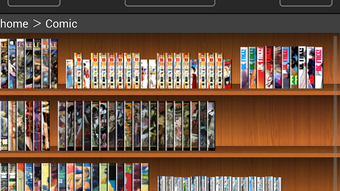
SideBooks features a simple, intuitive interface designed for ease of use on mobile devices. The layout emphasizes readability and accessibility, with minimal visual clutter. Navigation is handled through touch gestures such as swiping to move between pages, and users can scroll through documents vertically or horizontally depending on the content orientation.
Workflow efficiency is enhanced by the app’s automatic bookmarking and text search functions, which reduce manual effort during extended reading sessions. The interface does not appear to include advanced customization options, suggesting a focus on simplicity over configurability.
Performance observations are based on general software behavior patterns. The developer did not specify resource usage details, and no information was provided about CPU or RAM consumption. However, the application’s file size of 10.5 MB indicates a lightweight design, likely resulting in low memory and processing demands. Stability is not explicitly addressed, but the app’s core functions—such as file loading, navigation, and search—are fundamental to its purpose and are expected to operate reliably under normal conditions.
Compatibility & System Requirements
SideBooks is designed to run on Android devices, as specified by the developer. The software version is 1.0, released on September 25, 2023. The installation size is 10.5 MB, which suggests minimal storage impact.
Exact system requirements were not listed. Platform compatibility information is limited to Android, but no specific version (e.g., Android 8.0 or higher) was provided. Hardware requirements, including processor type, RAM, or storage capacity, were not specified. Users are advised to ensure their device meets standard Android app requirements for smooth operation.
Pros and Cons
Pros
- Free to download and use with no in-app purchases
- Supports multiple file formats including PDF, CBZ, CBR, ZIP, and RAR
- Automatic saving of the last read page for easy resumption
- Text search capability for efficient document navigation
- Screen rotation lock enhances usability during reading
- Lightweight design with minimal storage footprint (10.5 MB)
Cons
- No information provided on system requirements or compatibility details
- Automatic startup may be unwanted for some users
- Limited to Android platform; no desktop or cross-platform availability
- Basic interface without advanced customization options
- Exact performance and resource usage details were not specified
FAQ Section
Is SideBooks available for Windows or Mac?
SideBooks is designed exclusively for Android devices. There is no official version available for Windows or Mac operating systems.
Can I use SideBooks offline?
Yes, SideBooks functions fully offline. No internet connection is required to open, read, or navigate through documents and comics.
Does SideBooks support password-protected files?
Yes, the app includes a password protection feature to secure sensitive documents and comics.
How does the automatic page saving work?
SideBooks automatically remembers the last page viewed and restores it the next time the file is opened, allowing users to resume reading seamlessly.
Are there any updates or future releases planned?
While the developer has not announced future updates, the app is currently available in version 1.0 with all core features implemented.
Final Thoughts
SideBooks delivers a focused, efficient solution for users seeking a simple yet functional PDF and comic viewer on Android. Its support for multiple formats, text search, and automatic bookmarking make it a practical tool for daily reading tasks. The app’s lightweight nature and free pricing model enhance its accessibility, especially for users who prioritize ease of use over advanced features.
While the lack of detailed system requirements and platform expansion limits its appeal for some, the core functionality is reliable and well-suited for casual readers, students, and professionals managing digital documents. The inclusion of screen rotation lock and password protection adds practical value for privacy-conscious users.
For those looking for a secure, no-frills reading app that works well on Android devices, SideBooks stands out as a solid choice. Download SideBooks now.






.png)
